VC
OA Video Cast
Live video plus 24/7 WebTV control with RTMP ingest, HLS playback, media libraries, playlists, scheduling, relay outputs and analytics.
 Online Audience Video Streaming
Build a 24/7 WebTV channel with OA Video Cast or produce a professional live programme with OA Live Studio. Two purpose-built Online Audience platforms cover automated channel operation, browser production, RTMP, HLS, WebRTC, multistreaming, recordings, graphics, analytics and public playback.
Run live, scheduled or hybrid video without piecing together unrelated server tools and third-party control panels.
Live video plus 24/7 WebTV control with RTMP ingest, HLS playback, media libraries, playlists, scheduling, relay outputs and analytics.
A browser-based production studio with Preview and Program, WebRTC, OBS/RTMP input, scenes, audio mixing, graphics, recordings and multistreaming.
OA Video Cast combines live input, 24/7 programme automation, media, playback, audience insight and channel operations in one modern control plane.
Bring OBS, hardware encoders or studio feeds live with channel-aware stream control.
Deliver browser-friendly public video with SSL-ready HLS output.
Run automated playlists and scheduled programme blocks when nobody is live.

Move through live input, media, programme automation, playback, audience insight and infrastructure health from one broadcaster-focused workspace.
The dashboard is organised around the jobs a channel operator actually performs instead of exposing a wall of server tools.

Powerful streaming infrastructure is grouped into clear product areas so daily channel operation stays understandable.
Accept encoder input for live programming with isolated stream keys and channel-focused control.
Programme playlists, folders and scheduled blocks so the channel can continue around the clock.
Upload, organise and prepare channel media for playlists and scheduled output.
Extend channel output into additional destinations while retaining one primary control plane.
Understand viewer activity, bandwidth and broad privacy-aware audience geography.
Track operational events and channel services alongside the broadcast workflow.
OA Video Cast brings each stage of WebTV operation into one clear workflow.
RTMP live source from OBS, an encoder or your production environment.
Organise your video library and WebTV folders.
Build programme blocks and automated playlists.
Use the managed FFmpeg broadcast pipeline behind the platform.
Publish HLS playback for your audience.
Track viewers, bandwidth and channel events.
Choose managed cloud hosting or licence the platform for a compatible Linux server.
Stream, produce, record, multistream and engage from one professional online control room.
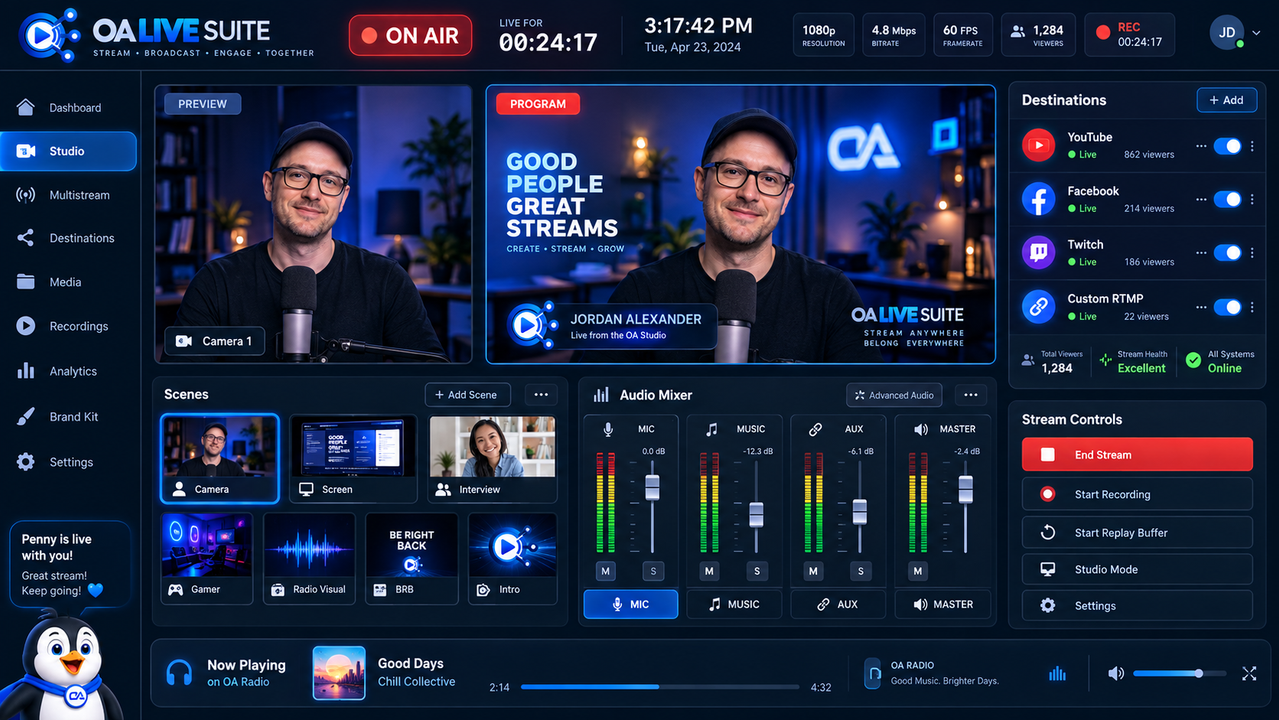
Go live from your browser camera and microphone, connect OBS or another RTMP encoder, prepare scenes, mix audio, add graphics and send your programme to multiple destinations at the same time.
Prepare in Preview, take scenes to Program, manage audio, graphics and destinations, and keep broadcast status visible from one screen.
Use CUT and FADE transitions and keep changes safely in Preview until you take them live.
Broadcast with camera and microphone directly from the browser without requiring an external encoder.
Use OBS, vMix, Wirecast, Larix or compatible hardware encoders through RTMP/RTMPS.
Send your programme to YouTube, Facebook, Twitch and custom RTMP/RTMPS destinations simultaneously.
Control MIC, MUSIC, AUX and MASTER channels with faders, mute, solo and vertical VU meters.
Use camera, inset, screen + PiP, split-screen, visual radio, gamer and holding layouts.
Add lower thirds, tickers, clocks, logos, scoreboards and reusable Brand Kit styling.
Use a Media Bin for graphics, videos, music, jingles, intros and overlays plus a recording library.
Use OA Stream Deck controls and a remote phone or tablet controller for fast production actions.
OA Live Studio supports broadcasting workflows across radio, music, gaming, worship, sport, events and business.
Create visual radio with presenter cameras, audio visualisation, Now Playing information, jingles, music beds and station graphics.
Combine gameplay, webcam, graphics, music and prepared Starting Soon, Gameplay, Just Chatting and BRB scenes.
Produce interviews, podcasts, launches, conferences and online shows with professional scenes and multistream distribution.
Broadcast services with camera, screen sharing, scripture graphics, lower thirds, branding and recording.
Build match coverage with cameras, scoreboards, team names, clocks, sponsor branding and live graphics.
Run company announcements, product launches, webinars, training and presentations through a branded production studio.
Every customer receives the complete Live Studio feature set. Choose Online Audience hosted or self-hosted on your compatible server.
OA Video Cast and OA Live Studio solve different parts of the video workflow, but they can also complement each other.
OA Video Cast is designed around channel ingest, media, scheduling, automation, HLS playback and ongoing WebTV operation.
OA Live Studio is the browser production environment for cameras, screen share, Preview/Program switching, audio mixing, scenes, graphics and multistreaming.
Yes. Its 24/7 playlist and scheduling workflow is designed to keep automated programming running between live broadcasts.
Yes. OA Video Cast accepts RTMP ingest, while OA Live Studio supports OBS and other RTMP/RTMPS encoders as production sources.
No. Managed options are available. Self-hosted licences are also available when you want to run supported software on your own compatible server.
Yes. The platforms include public playback workflows, and OA Live Studio includes an embeddable live player for your own site.
Use OA Video Cast for managed 24/7 channel operation, OA Live Studio for professional live production, or speak to us about the best setup for a mixed workflow.
Whether you are choosing a service, configuring an account or need technical help, Online Audience support is only a click away.
 Penny is online